
Tutorial 3: Synchrotron Emissions
In this tutorial we will consider a population of electrons undergoing cooling due to a radiation reaction force induced by a magnetic field (just as in Tutorial 2: Cooling of Electrons via Radiation Reaction) but additionally included the emitted population of synchrotron photons.
we will compare the cooling and emissions generated by Diplodocus to that from the single-zone code AM3 (Klinger et al., 2024), for this we will use a power-law distribution of electrons which will initially be isotropic, the magnetic field will also be taken to be isotropic as it is in AM3.
INFO
The full code for this tutorial is split into two files SynchrotronCollisionMatrix.jl for generating the emission matrix for the synchrotron emissions and SynchrotronTransport.jl for the evolution of the system. Both can be found in src/tutorials/Tutorial3_Synchrotron/.
Building the Gain Collision Matrix
Before considering these scenarios, we must first construct the Gain matrix for the emissive process that is synchrotron. Just the same a binary collisions, emissive interactions are managed using the functions contained within the DiplodocusCollisions sub-package of Diplodocus.
First step is to define the three particles string (Particles, Grids and Units) and for emissive interactions particle (1) refers to the incoming particle with (23), in alphabetical order refer to the outgoing emitted particles. The type of emissive interaction is defined similarly by a string, in this case sync for synchrotron.
    using Diplodocus

    name1::String = "Ele";
    name2::String = "Ele";
    name3::String = "Pho";
    type::String = "Sync";
Next thing to do is to setup the momentum-space grids just as in Tutorial 2: Cooling of Electrons via Radiation Reaction. For this tutorial we will consider the electron momentum to range from
    p_low_Ele = -3e0
    p_up_Ele = 7e0
    p_grid_Ele = "l"
    p_num_Ele = 80
    u_grid_Ele = "u"
    u_num_Ele = 9
    h_grid_Ele = "u"
    h_num_Ele = 1

    p_low_Pho = -15e0
    p_up_Pho = 7e0
    p_grid_Pho = "l"
    p_num_Pho = 88
    u_grid_Pho = "u"
    u_num_Pho = 9
    h_grid_Pho = "u"
    h_num_Pho = 1
Emissive interactions take a vector Ext of values as an input that refer to the external parameters that induce the emissive interaction. For synchrotron this is the magnetic field strength taken to be
Ext::Vector{Float64} = [1e-4,];Now we define how many points in momentum-space will be sampled per bin by the Monte-Carlo integration procedure, and the range of scale factor used to weight the sampling (as of writing a
    numLoss = 256
    numGain = 256
    numThreads = Threads.nthreads()

    scale = 0.0:0.1:0.0
Then define the fileLocation where the collision matrices are to be saved and generate the integration Setup and fileName using the UserEmissionParameters function
    fileLocation = pwd()*"\\Data"
    (Setup,fileName) = UserEmissionParameters()
Finally, we can run the integration using EmissionInteractionIntegration.
EmissionInteractionIntegration(Setup)Checking the Gain Matrices
Just as is the case with binary collisions, as the integration of the emission matrices relies on Monte-Carlo sampling its accuracy isn't guaranteed. For Synchrotron, only the gain of photons is calculated as the change in the electron population is evaluated as a radiation reaction force (a complete self consistent description is being worked upon). Therefore we cannot guarantee conservation of energy between these two methods. However, we can check whether the emission spectra of photons exhibits any noise from the sampling process. This can be checked by loading the file using EmissionFileLoad_Matrix and using the plotting function InteractiveEmissionGainLossPlot, which will display the plot in separate window where it can be interacted with.
    Output = EmissionFileLoad_Matrix(fileLocation,fileName);
    InteractiveEmissionGainLossPlot(Output)
Evolving the System Through Phase Space
With the emission matrix for the synchrotron photons generated, we can start to setup the evolution of the system through phase space via the functions contained within the DiplodocusTransport package.
Phase Space Setup
We will consider a homogenous spherical geometry and evolve the system using a logarithmic grid in time from SIToCodeUnitsTime.
    t_up::Float64 = log10(SIToCodeUnitsTime(1e8)) # seconds * (σT*c)
    t_low::Float64 = log10(SIToCodeUnitsTime(1e0)) # seconds * (σT*c)
    t_num::Int64 = 400
    t_grid::String = "l"

    time = TimeStruct(t_up,t_low,t_num,t_grid)

    space_coords = Spherical()# x = r, y = theta, z = phi

    x_up::Float64 = 1.0
    x_low::Float64 = 0f0
    x_grid::String = "u"
    x_num::Int64 = 1

    y_up::Float64 = pi
    y_low::Float64 = 0.0
    y_grid::String = "u"
    y_num::Int64 = 1

    z_up::Float64 = 2.0*pi
    z_low::Float64 = 0.0
    z_grid::String = "u"
    z_num::Int64 = 1

    space = SpaceStruct(space_coords,x_up,x_low,x_grid,x_num,y_up,y_low,y_grid,y_num,z_up,z_low,z_grid,z_num)
Next we will define the momentum space grids to match that of our interaction matrix
    name_list::Vector{String} = ["Ele","Pho"];

    momentum_coords = Spherical() # px = p, py = u, pz = phi

    px_up_list::Vector{Float64} = [7.0,0.0];
    px_low_list::Vector{Float64} = [-3.0,-15.0];
    px_grid_list::Vector{String} = ["l","l"];
    px_num_list::Vector{Int64} = [80,88];

    py_up_list::Vector{Float64} = [1.0,1.0];
    py_low_list::Vector{Float64} = [-1.0,-1.0];
    py_grid_list::Vector{String} = ["u","u"];
    py_num_list::Vector{Int64} = [9,9];

    pz_up_list::Vector{Float64} = [2.0*pi,2.0*pi];
    pz_low_list::Vector{Float64} = [0.0,0.0];
    pz_grid_list::Vector{String} = ["u","u"];
    pz_num_list::Vector{Int64} = [1,1];

    momentum = MomentumStruct(momentum_coords,px_up_list,px_low_list,px_grid_list,px_num_list,py_up_list,py_low_list,py_grid_list,py_num_list,pz_up_list,pz_low_list,pz_grid_list,pz_num_list,"upwind");
In this tutorial we don't have any binary interactions but we do need to include a forcing term for the radiation reaction SyncRadReact and an emission corresponding to the synchrotron photons that are emitted EmiStruct. We will construct the forcing term just as Tutorial 2: Cooling of Electrons via Radiation Reaction, and initially we shall consider the magnetic field to be isotropically averaged, thereby a direct comparison to AM3 can be made. For the emission term the struct EmiStruct takes six arguments, the first five correspond to particle and external field setup used to generate the collision matrix in the form mode which just like the force term can be either Ani, Axi or Iso.
    Binary_list::Vector{BinaryStruct} = [];
    Emi_list::Vector{EmiStruct} = [EmiStruct("Ele","Ele","Pho","Sync",[1e-4],Iso())];
    Forces::Vector{ForceType} = [SyncRadReact(Iso(),1e-4),];
Now lets collect all the system information within the PhaseSpace struct:
PhaseSpace = PhaseSpaceStruct(name_list,time,space,momentum,Binary_list,Emi_list,Forces)and build the interaction and flux matrices used internally by the solver
    DataDirectory = pwd()*"\\Data"
    BigM = BuildBigMatrices(PhaseSpace,DataDirectory;loading_check=true);
    FluxM = BuildFluxMatrices(PhaseSpace);
Initial Conditions
For this tutorial we will initially give the electron population a relativistic power-law distribution with an index of Initial_PowerLaw:
    Initial = Initialise_Initial_Condition(PhaseSpace);
    Initial_PowerLaw!(Initial,PhaseSpace,"Ele",pmin=1e3,pmax=1e6,umin=-1.0,umax=1.0,hmin=0.0,hmax=2.0,index=2.0,num_Init=1e6);
For the photons, initially there shouldn't be any, so we don't need to set any initial condition as Initialise_Initial_Condition sets all populations to zero when initialising the state vector.
Running the Solver
Let's quickly setup the scheme, fileName and fileLocation just the same as the previous tutorials
    scheme = EulerStruct(Initial,PhaseSpace,BigM,FluxM,false)
    fileName = "Sync.jld2";
    fileLocation = pwd()*"\\Data";
Then run the solver (in this case it will save every 5 time steps):
sol = Solve(Initial,scheme;save_steps=5,progress=true,fileName=fileName,fileLocation=fileLocation);Plotting Results
We can load the results using
(PhaseSpace, sol) = SolutionFileLoad(fileLocation,fileName);and then plot how the momentum distribution evolves over time using MomentumDistributionPlot:
MomentumDistributionPlot(sol,["Pho","Ele"],PhaseSpace,Static(),step=10,order=2,wide=true,plot_limits=((-15.0,7.0),(2.5,9.5)),TimeUnits=CodeToSIUnitsTime)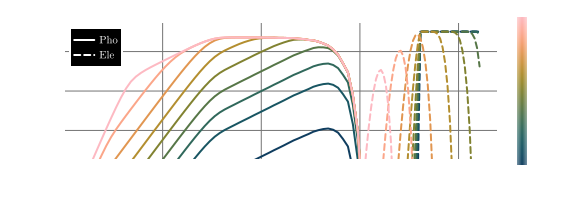 In the above, there are a few options of note, first is that by inputting a vector of strings for the particle species we can plot multiple species on a single plot, seconds is the option
 wide=true which defaults the figure size to a full page width figure for publication in an A4 document. Last is the option for TimeUnits, this is a function that tells the plotting function what units to put for time, in this case CodeToSIUnitsTime converts all code units to the SI unit of seconds.
We can also generate the animation at the top of the page using by simply changing Static to Animated:
MomentumDistributionPlot(sol,["Ele","Pho"],PhaseSpace,Animated(),thermal=false,order=2,plot_limits=((-15.0,7.0),(2.5,9.5)),wide=true,TimeUnits=CodeToSIUnitsTime,filename="SyncPDisAnimated.mp4")and further we can plot how energy changes between the electron and photon population:
EnergyDensityPlot(sol,PhaseSpace,TimeUnits=CodeToSIUnitsTime)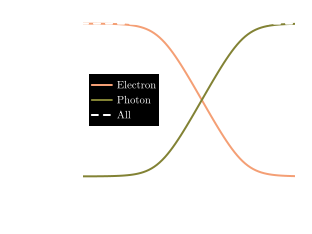 As we can see, energy is not quite conserved. This is due to numerical diffusion of the electron population and the way the cooling of electrons and emission of photons are handled within Diplodocus. Electrons are cooled by a radiation reaction force which is implemented as an analytically integrated force flux, whereas photons are emitted via an emission matrix, the terms of which are integrated via a Monte-Carlo method. In the limit of infinite momentum grid resolutions, these two methods converge on perfect energy conservation but there is a difference for finite grids that scales inversely to grid resolution - a scaling factor to counter this effect is under development and will feature in a future version of Diplodocus.
Comparison to AM3
The single zone code AM3 is quite capable of replicating an identical setup as above. with these initial conditions, the evolution of the electron and photon populations using AM3 looks like: 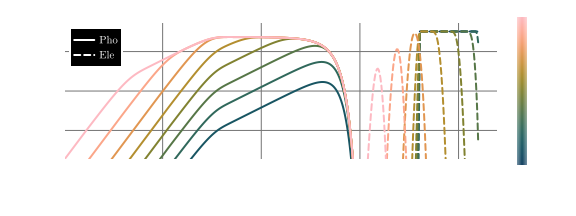 .
.
Notice how the Diplodocus and AM3 plots are almost identical (as is to be expected) but there are a few subtle differences. Diplodocus shows a steeper cut-off in emissions at low photon momentum. This is due to Diplodocus using an analytic expression for the synchrotron spectra that is valid at all electron momenta, whereas AM3 uses an expression that is only true for relativistic electrons. Hence, as the electron cool to sub-relativistic (
Reference
- Klinger, M.; Rudolph, A.; Rodrigues, X.; Yuan, C.; Fichet de Clairfontaine, G.; Fedynitch, A.; Winter, W.; Pohl, M. and Gao, S. (2024). AM3: An Open-source Tool for Time-dependent Lepto-hadronic Modeling of Astrophysical Sources. ApJS 275, 4.