
Tutorial 1c: Plotting Results
Now that we've run the simulation, we can use a variety of pre-built plotting functions from DiplodocusPlots to plot and analyse the results.
Load the Simulation Output
First thing to do is load the simulation output using the same fileLocation and fileName as before:
using Diplodocus

fileName = "tutorial1_output.jld2"
fileLocation = joinpath(pwd(),"Data")
(PhaseSpace,sol) = SolutionFileLoad(fileLocation,fileName)
Particle Distribution
The particle spectrum as a function of momentum and polar angle can then be plotted using the function MomentumAndPolarAngleDistributionPlot0D. All plots take the same three common inputs: the type of the plot (lots of plots have Static and Animated versions), the PhaseSpace of the simulation, and the simulation output sol. After these three inputs, most plots have some specific required arguments. In this case we will plot a Static plot that requires us to specify and abbreviated species name in the form of a three letter String e.g. ["Sph"] and three input times (in code units or time steps) in the form of a Tuple e.g. (1,11,1001). We can also provide plots with a series of optional keyword argument but for now we will just leave those as their default values.
PAndUDisPlot = MomentumAndPolarAngleDistributionPlot(Static(),PhaseSpace,sol,["Sph"],(1,11,1001))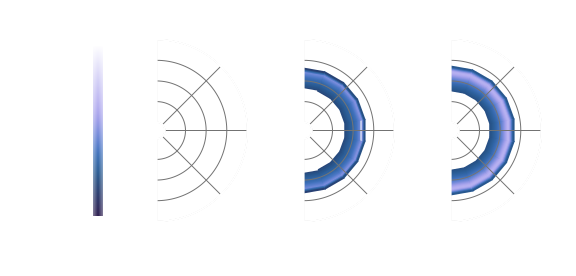
This shows the "diffusion" of particles in both momentum and angle as a result of the binary interaction between spheres.
To save this plot, we can use the save function:
save("Tutorial1_PAndUDisPlot.svg",PAndUDisPlot)This will save the plot in a .svg format in the current working directory.
With the angular dependence, it is hard to interpret the shape of the distribution in momentum from this 2D heatmap. To visualise this spectral shape in momentum we can also plot the angle-averaged distribution using MomentumDistributionPlot0D:
PDisPlot = MomentumDistributionPlot0D(Static(),PhaseSpace,sol,["Sph"];step=10,thermal=true,plot_limits=(-1.4,2.1,-3.4,0.9))
save("Tutorial1_PDisPlot.svg",PDisPlot) # jl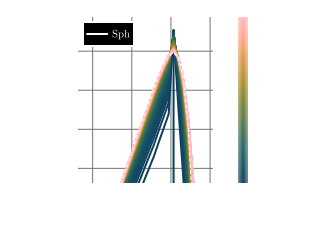
With the keyword step=10 we are only plotting every 10 time steps of the simulation output, and with thermal=true the expected shape of a perfect thermal (Mawell-Juttner for massive particles) distribution is over-plotted as a dashed line for comparison. We can see that as time evolves the spheres approach the thermal distribution, but "over-shoot" at momenta away from the peak, this is linked to numerical diffusion due to the finite bin sizes.
We can also use IsThermalAndIsotropicPlot0D to tell us how close we are to the expected thermal and isotropic distribution as a function of time:
TandIPlot = IsThermalAndIsotropicPlot0D(Static(),PhaseSpace,sol,"Sph")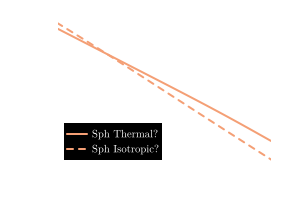
From which we can see that the distribution of hard spheres is exponentially approaching thermalisaion and isotropisation, as was expected.
Conservation Plots
It is also important to check some convergence statistics. Here we want to check that the total number of particles and energy in the system is conserved. We can plot the fractional change of these properties per time step by using NumberDensityPlot0D and EnergyDensityPlot0D with the keyword argument frac=true. For the energy plot we can also look at the fractional change in energy per particle by setting perparticle=true:
NumPlot = NumberDensityPlot0D(Static(),PhaseSpace,sol,species="Sph";frac=true)
EngPlot = EnergyDensityPlot0D(Static(),PhaseSpace,sol,species="Sph";frac=true,perparticle=true)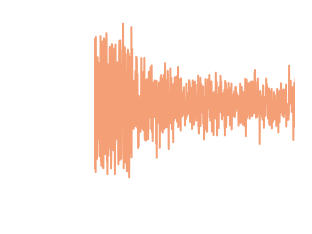
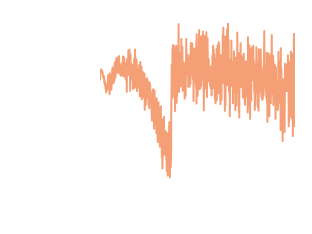
We can see that for our simulation, particle number and total energy are conserved to the numerical precision of the simulation!
Animated Plotting
You may have noticed that the the momentum plots take Static() as an argument, this tells DiplodocusPlots.jl that you would like a generate a publication ready static vector plot. But there is an alternative, if instead you were to replace Static() with Animated(), rather than a static plot you would get a rendered .mp4 file of the time evolution. This can be done for both MomentumAndPolarAngleDistributionPlot0D and MomentumDistributionPlot0D individually or you can use the function MomentumComboAnimation0D to plot both at the same time!
AniPlot = MomentumComboAnimation0D(Animated(),PhaseSpace,sol,["Sph"];plot_limits_momentum=(-0.2,1.9,-2.1,0.8),filename="Tutorial1_Animation.mp4",thermal=true,framerate=24)